Add free chat support to your MSP without a new inbox to monitor
Chat Starter connects your clients to your team wherever they work, and automatically creates tickets in your PSA.
It's free, takes minutes to set up, and is easy to expand when you're ready.
No credit card required
What you get for free
2 Client Channels
Deploy to Teams, Slack, your portal, or your website. Mix and match.
Unlimited Agents
No per-seat cost. Every tech on your team can handle escalations.
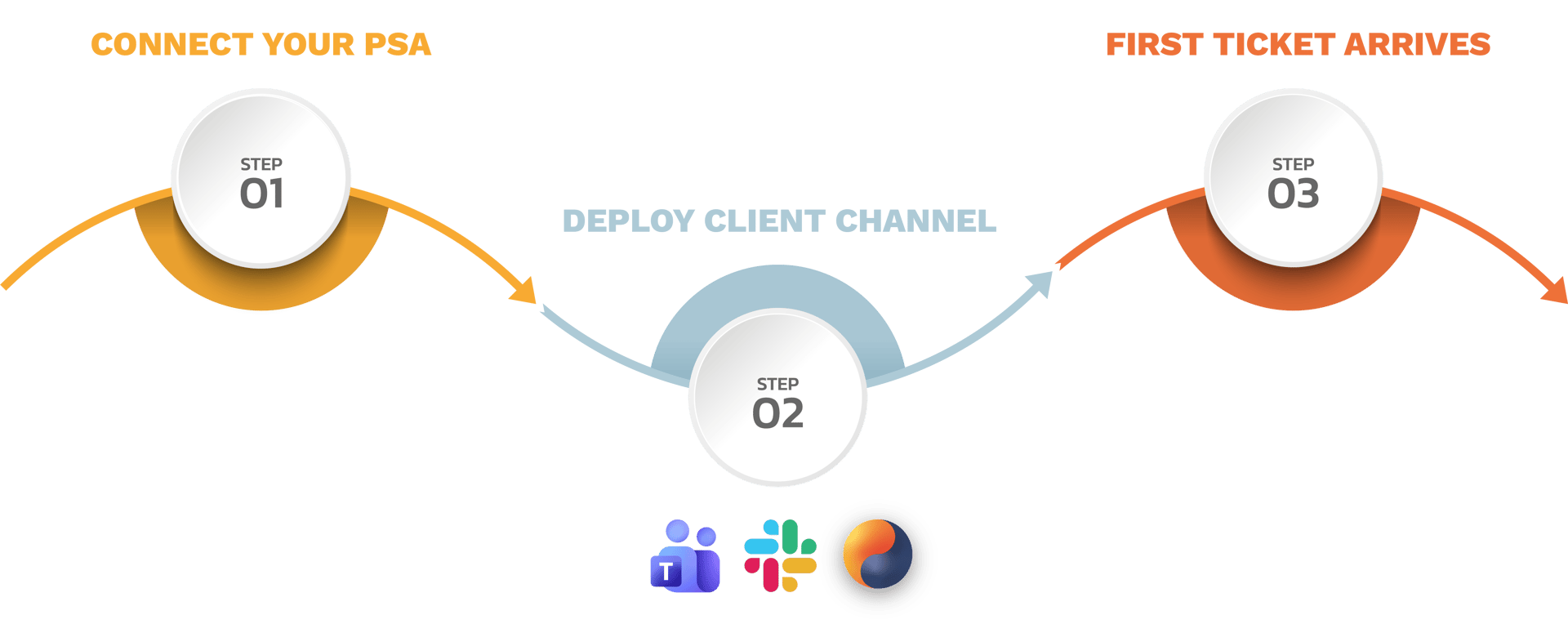
Set up in under 5 mins
From signup to your first PSA ticket. No consultant required.
Trusted by MSPs on ConnectWise, Autotask, Syncro, HaloPSA, and BMS
EASY, SELF-SERVICE SETUP
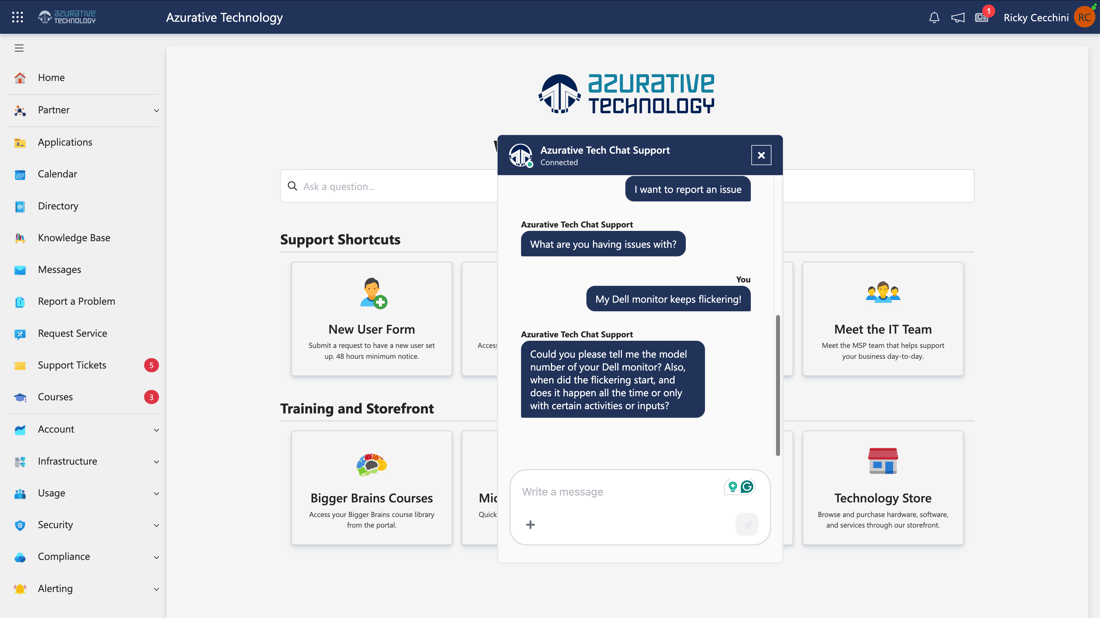
Meet your clients where they already work
Deploy a chat channel to the CloudRadial portal, Microsoft Teams, Slack, or your website — all from the same admin dashboard.
Your clients start a conversation the same way they'd message a coworker. No portal password to remember. No phone queue to join.
Starter includes two client channels: any combination of UCP, Teams, Slack, or web.
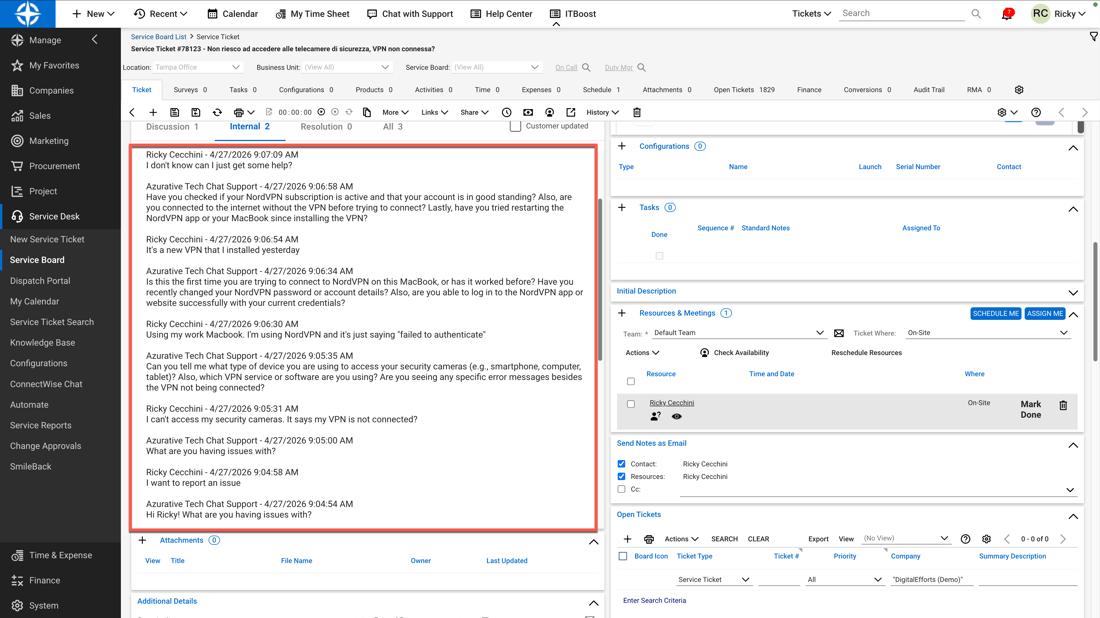
Every conversation becomes a PSA ticket with the full transcript
When a client chats, the system guides them through a structured intake and creates a ticket in your PSA — with the complete conversation attached as a note. If the client walks away mid-chat, you still have the ticket. If an agent gets pulled away, you still have the ticket. No request disappears.
Tickets include the full conversation transcript. Agents see exactly what was reported before they ever touch the issue.
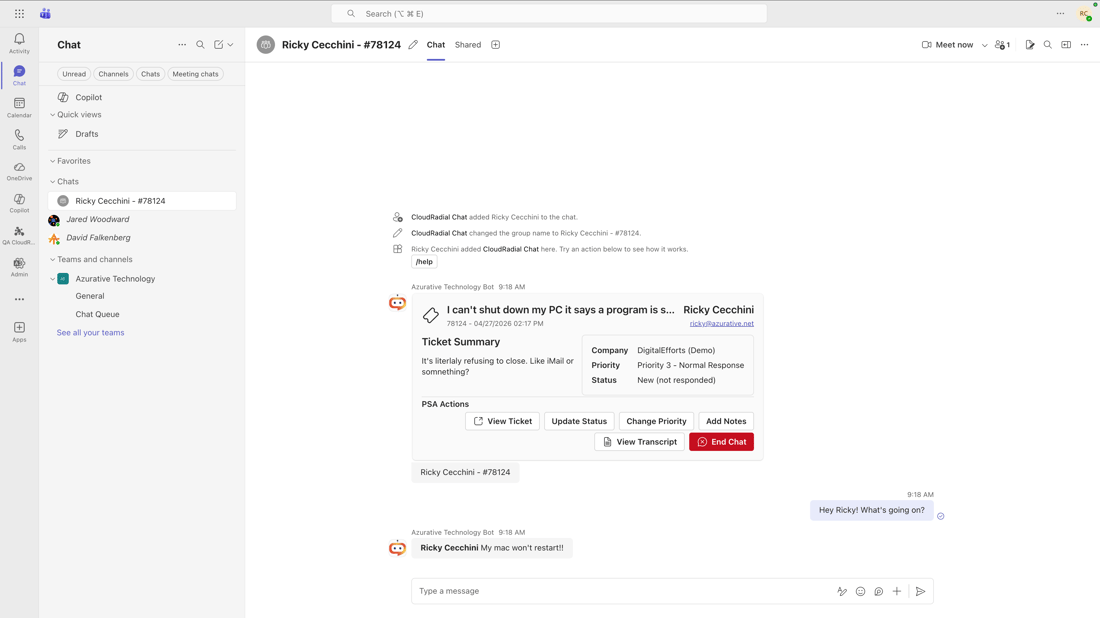
Live chat escalations land in Teams or Slack where your agents already are
When a client needs a live agent, a notification card appears in the Teams or Slack channel your team already monitors. One click and the agent is in a private group chat with the client and the conversation history in front of them. No new tool to learn. No separate inbox to watch.
Agents can handle multiple chats simultaneously. Slash commands let them update ticket status without leaving the conversation.
Start free. Upgrade when you're ready.
Chat Professional adds AI: probing for richer ticket detail, smart routing, and more.
Chat Professional
AI for Triage and Resolution
Chat Professional adds the ChatAI Responder for natural-language Tier 0 troubleshooting, SMS, agent-initiated chat, and a second service channel.
Includes five client channels and per-channel customization — different branding, ticket destinations, and automated messages per channel.
Chat Enterprise
A Revolutionary Chat Experience
Combined with the power of ServiceAI, ChatAI becomes trained on your expertise and handles client interactions like your best technician would.
Chat Enterprise adds multi-PSA support, a custom dialog builder, custom capabilities, and 5+ service channels for larger teams.
Chat Starter FAQ
-
Does Chat Starter require other CloudRadial products?
Chat Starter doesn’t require any of our other products.
It does require one of the following PSAs: ConnectWise, Autotask, Syncro, HaloPSA, or Kaseya BMS.
-
How long does it take to set up Chat Starter?
Most MSPs are live in under five minutes once they've registered. A guided wizard walks you through connecting your PSA, picking the default queue, status, and priority for incoming chats, and choosing where chats appear for your team (Teams or Slack). The Teams deployment includes a one-time admin consent step to install the app in your tenant.
-
Is Chat Starter really free? What's the catch?
Yes — free, no credit card, no time limit, and unlimited agents. Chat Starter is the entry point into CloudRadial's chat platform. When you're ready for natural-language Tier 0 support, SMS, agent-initiated chat, or multi-PSA setups, you can upgrade to ChatAI (Professional or Enterprise) without changing tools.
-
What do I need to know about using Teams or Slack as a client channel?
Chat Starter supports Teams and Slack as client channels, with one important note: Teams and Slack deployment happens outside the onboarding wizard and is limited to a single client. That's intentional.
Deploying chat into a client's Teams or Slack tenant involves admin consent and configuration steps that can significantly extend your setup time — and we'd rather you be live in minutes than bogged down in IT coordination on day one.
Start with web or UCP, see how chat transforms your support intake, and add Teams or Slack for your most important client when you're ready.
-
What happens to a chat if the client walks away before it's done?
Every conversation is logged, and a ticket is created through the chat process with the full transcript attached. If the client closes the tab or never replies, you still have a documented ticket with full context — nothing gets lost in a private chat session.
-
How does the hand-off to a live agent actually work?
When a client asks for a live agent, a notification posts to the Teams or Slack channel your team already monitors. One click puts your tech into a private chat with the client and the bot — with the ticket and full conversation history at hand. No new app to learn, no separate inbox to check.
-
Can my techs update the PSA ticket from inside Teams or Slack?
Yes. Agents can update ticket status and add internal notes without leaving the conversation, and updates flow back to your PSA automatically so the ticket and the chat stay in sync. Actions are available through the bot in your Teams or Slack channel — no separate interface required.
-
Do I have to roll Chat Starter out to every client at the same time?
No. Chat Starter includes two client channels, and you can set up Teams or Slack for one client to start — a good way to pilot the experience with your most active client before expanding. When you're ready to scale to more clients and more channels, Chat Professional includes five client channels with additional ones available if you need them.
-
What's the difference between Chat Starter, Professional, and Enterprise?
To start, the number of client channels. Chat Starter includes a limit of two channels.
Chat Professional includes five, with additional channels available for purchase, plus per-channel customization — different branding, ticket destinations, and automated messages per channel. Chat Professional also adds the ChatAI Responder for natural-language Tier 0 troubleshooting, SMS, agent-initiated chat, and a second service channel.
Chat Enterprise adds multi-PSA support, a custom dialog builder, custom capabilities, and 5+ service channels for larger teams. For more details, visit our pricing page.
-
Can I brand the chat and set the hours we're live?
Yes. Chat Starter includes basic account-level branding and configurable live hours so the chat experience matches your MSP and sets honest expectations for your clients about when a human is available.